CygNet Dynagraph Control
 The CygNet Dynagraph Control is an ActiveX control used in CygNet Studio and CygNet Vision screens to provide a customizable means to view and interact with a range of dynagraph cards. It has numerous properties available for configuration and you can embed numerous CygNet dynagraph controls in TheView, each able to display up to five cards per card type.
|
Example Dynagraph Control in Run Mode |
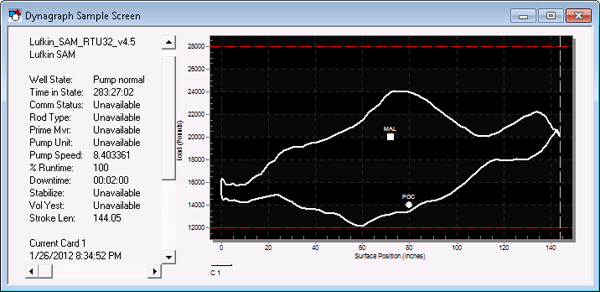
Available card types are as follows:
- Current Card: A current card describes the most recent stroke stored in the RTU. This card type is used for analyzing real-time pump information.
- Shutdown Card: A shutdown card, or pump-off card, is generated when the pump is turned off, usually to wait for the reservoir to fill.
- Pump-Up Card: A pump-up card is generated when the pump fully starts again after having been shut down.
- Reference Card: A quick reference or snapshot of a dynagraph card.
- Start Card: A start card is generated for the first stroke when the pump starts again after having been shut down.
- Ideal Card: Returned from an external system. Calculates an ideal rod pump stroke card based on a set of configuration items. Can be used as a way to compare actual and ideal strokes, and to adjust current configuration to a more ideal state.
This control depends on at least one of the following CygNet dynagraph-enabled equipment interface engines (EIEs) from which to retrieve data:
- AutoCom EIE
- eProdRPC EIE
- Lufkin MPC EIE
- Lufkin SAM EIE
- Modbus EFM EIE
- OPC Lufkin EIE
- OPC Weatherford EIE
- TriEnerTech EIE
For a useful example of a CygNet Dynagraph Control implemented in a pre-designed screen, open DYNAGRAPH.csf in the APPS SCREXAMP folder.
See CygNet Dynagraph Viewer for information about this control deployed as a client application.
See CxDynagraph for information regarding scripting and the CygNet Dynagraph Control object.
Contact CygNet Support for information about using this control in conjunction with an external connected system.
More:
 Configuring the Dynagraph Control
Using the Dynagraph Control in Run Mode
Dynagraph Control - Properties, Events, and Methods


